The Domain Name System (DNS) is the foundational map of the internet, but standard DNS lacks built in authentication, leaving it vulnerable to interception. Domain Name System Security Extensions (DNSSEC) is a suite of add on features that introduces an essential layer of cryptographic security to guarantee that DNS responses are authentic and untampered with during transit.
By implementing DNSSEC, you protect your website visitors from sophisticated redirection exploits and preserve your brand's digital integrity. Discover how DNSSEC operates and how Trustname’s built in features offer your business and your users the ultimate online protection.
Key Takeaways
- Defeats Cyber Threats – Actively blocks malicious DNS cache poisoning and man-in-the-middle attacks.
- Cryptographic Verification – Uses public key cryptography to verify that your website traffic routes exactly where it should.
- Seamless Dashboard Integration – Easily deployable for all generic Top Level Domains (gTLDs) natively within Trustname.
- Preserves Brand Reputation – Ensures your customers always reach your genuine site, fostering long-term digital trust.
TABLE OF CONTENTS
How DNSSEC Works
DNSSEC protects your domain by implementing several rigorous cryptographic security measures, which can be broken down into three main pillars:
- Digital Signatures – DNSSEC uses digital signatures to verify the authenticity of incoming DNS data. Each DNS zone utilizes a unique public/private key pair to generate these signatures via public key cryptography.
[+] [Callout] Info Insert title here [+] [Callout] Title/Title with Icon -> Every DNS zone and its individual DNS elements are signed with the owner's private key, and the resulting signature is stored directly alongside the standard DNS records. When a user visits your website and a DNS resolver issues a query, the resolver uses the corresponding public key (which is publicly accessible) to decrypt and verify the signature.
This process ensures that the returned IP address is legitimate and that the data has not been altered by an unauthorized third party.
- Chain of Trust – DNSSEC relies on a strict hierarchical chain of trust that extends from the root DNS zone down to your specific domain name. Each distinct level in the DNS hierarchy (the root zone, the Top Level Domain or TLD, and the specific domain) signs its own data.
This creates an unbroken verification chain that allows DNS resolvers to confirm the authenticity of the entire.
To ensure that the public key itself is authentic, it is signed by the private key of the root or parent DNS zone.
This overarching, verified public key is known as a trust anchor. Because signing cryptographic keys with other cryptographic keys up the hierarchy establishes a clear chain of trust.[+] [Callout] Default Insert title here [+] [Callout] Title/Title with Icon -> DNS resolvers maintain a pre validated list of these trust anchors to effortlessly verify the authenticity of individual DNS zone public keys.
- Validation – When a DNS resolver receives a DNS response, it evaluates both the digital signatures and the associated chain of trust. If the system validates everything correctly,
The resolver securely provides the authentic DNS response to the user's browser. If the validation checks fail, the resolver automatically rejects and deletes the compromised response, returning an error message to the browser so the visitor is protected from potential fraud.
Enabling DNSSEC At Trustname
Follow these simple steps to enable DNSSEC for your domains directly within the Trustname customer portal.
For gTLD Domains Using Trustname Nameservers
- Log In to Your Trustname.com Account – Navigate to the official Trustname.com website and click the "Log In" button. Enter your username and password to access your account dashboard.
- Select Your Domain – Locate the Domains dropdown menu at the top of the portal and click on "Registered domains" to view your full portfolio. Click directly on the specific domain for which you want to enable DNSSEC.
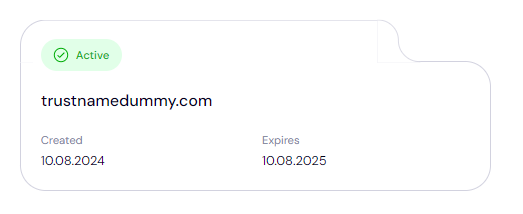
- Access DNSSEC Settings – Once on the main domain settings management page, scroll down until you locate the dedicated DNSSEC configuration section.
- Enable DNSSEC – Click on the "Enable" button to initiate the setup process. Follow the remaining on screen prompts to complete the activation. Trustname will automatically generate the required cryptographic keys and apply the appropriate DNSSEC records directly to your domain.

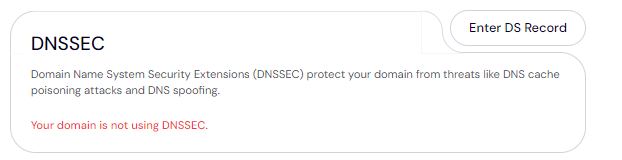
- Manual Setup for External DNS Providers – If your domain points to nameservers outside of Trustname, you must turn on DNSSEC at your external third party DNS provider first to generate a Declaration of Signing (DS) record. Once generated, you can add this DS record manually inside your Trustname account.
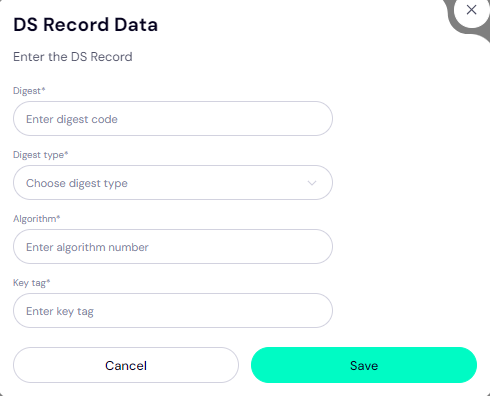
[+] [Callout] Info Insert title here [+] [Callout] Title/Title with Icon -> When adding a manual DS record to your Trustname settings, make sure you have the following four pieces of data copied from your third party DNS provider:
[+] [List] Green Unordered - Digest Code / Digest : The cryptographic hash string.
- Digest Type : The numerical indicator for the hashing protocol (e.g., 2 for SHA-256).
- Algorithm : The encryption identifier code (e.g., 8 for RSA/SHA-256).
- Key Tag : A short, 5 digit number identifying this specific key.
[+] [Callout] Info Domain Eligibility DNSSEC functionality is currently available for generic Top-Level Domains (gTLDs like .com, .net, .org) only. It is not supported for country code Top Level Domains (ccTLDs like .co.uk, .ca, or .de) within the Trustname.com platform.
- Verify Your DNSSEC Status – After successfully enabling DNSSEC for your domain, you can verify its active status using various online public validation tools. Some of the most reliable and widely used diagnostic platforms include
[+] [List] Green Unordered - DNSSEC Analyzer (by Verisign)
- DNSViz
- Internet.nl
Benefits of DNSSEC
What Are The Primary Advantages Of activating DNSSEC On Your Website?
- Enhanced Security – DNSSEC shields your users from targeted network threats by ensuring all incoming DNS responses are genuine and untampered with. This prevents your audience from falling victim to scammers utilizing man in the middle attacks or cache poisoning.
- Increased Trust – With DNSSEC active, your users can remain confident that the web responses they receive are accurate, secure, and originating directly from your actual, verified domains.
- Improved Integrity – DNSSEC guarantees that the data returned by a DNS query matches exactly what you published. Without DNSSEC enabled, malicious actors can silently redirect your visitors to fraudulent scam websites without their knowledge or consent.
FAQs
What is DNSSEC?
DNSSEC is a suite of security extensions added to the standard Domain Name System. It introduces a verification layer that checks DNS responses for authenticity and integrity, helping you protect your users from bad actors while preserving your brand reputation.
How does DNSSEC work?
DNSSEC uses advanced digital cryptographic signatures and an ordered chain of trust to verify that incoming DNS data is fully authentic and has not been altered during transit.
Can I enable DNSSEC for ccTLD domains at Trustname?
No. At this time, DNSSEC features are exclusively available for gTLD domains on Trustname.com. It cannot be applied to ccTLD extensions.
How do I enable DNSSEC for my gTLD domain?
Simply log in to your Trustname account, open your registered domain list, select your target domain, scroll down to access the "DNSSEC Settings" and click the prompts to automatically enable the service.
How can I verify if DNSSEC is enabled properly?
You can use free public online verification platforms, such as DNSSEC Analyzer, DNSViz, or Internet.nl, to check if your DNSSEC records are correctly configured and fully active across the global web.
By enabling DNSSEC, you introduce a powerful, enterprise-grade layer of security to your domain infrastructure. This protection neutralizes dangerous DNS-related threats and ensures that your brand's digital data remains consistently reliable, safe, and accurate.
Was this article helpful?
That’s Great!
Thank you for your feedback
Sorry! We couldn't be helpful
Thank you for your feedback
Feedback sent
We appreciate your effort and will try to fix the article