Choosing the right SSL certificate is essential for protecting your website, securing customer data, and building trust online. This guide explains how SSL certificates work, the different types available, and how to select the best option for your website.
Key Takeaways
- Data Protection – Encrypts website data to keep visitor information safe from cyber threats.
- SSL Types – Choose between Single Domain, Wildcard, or Multi-Domain SSL based on your website structure.
- Validation Levels – DV, OV, and EV certificates offer different levels of identity verification and security.
- Website Trust – Displays HTTPS and the security padlock, helping build visitor confidence and improve SEO.
- Right Choice – Select an SSL certificate based on your website's purpose, budget, and the number of domains you need to secure.
TABLE OF CONTENTS
- Key Takeaways
- What is an SSL certificate?
- How exactly do SSL certificates work?
- Who is a certificate authority?
- Types of SSL certificates on Trustname
- SSL Certificate Validation Tiers
- What is a certificate signing request (CSR)?
- Benefits of having an SSL certificate installed
- How To Choose The Right SSL Certificate For Your Needs
- SSL Certificates Are Easy With Trustname
Using a domain registrar and web host like Trustname is the easiest way to purchase and install an SSL certificate on your current domain name. And if you're registering your domain name for the first time, we give you all you need to get your website online including web hosting and a free basic SSL included.
Having an SSL certificate installed on your domain is non-negotiable. A website without one leaves your data exposed a dream target for hackers and cyber criminals looking for sensitive data like credit card information, addresses, personal info, etc. to steal.
However, with an SSL certificate, all the data exchanged between your website and your visitor's browser is encrypted. An SSL certificate also gives your domain the 'HTTPs' seal of trust which is now a ranking factor on search engines like Google, Bing, or DuckGoGo.
If this is your first rodeo with SSL certificates, the lingo can be a bit confusing, we get it. What are the different types of SSL certificates and how do you choose? Who is a certificate authority and why do they matter? You'll find all the answers in the rest of this guide.
Ready to take the plunge? Let's dive right in! Oh, but first…
What Is An SSL Certificate?
SSL stands for Secure Sockets Layer and it is basically the security standard for how data being transferred between a web browser and a website server should be encrypted.
The SSL certificate itself is a digital certificate that is installed on the root server of your website.
It is simply a digital file that contains information like your domain name, WHOIS data, your business name, the certificate authority issuing the SSL certificate plus their digital signature, your website's public key, and the registration/expiry dates of the certificate.
Whenever a visitor searches your domain name, all this data contained in the SSL certificate is required to authenticate that your visitor's website browser is connecting to the correct server hosting your website and establish the encrypted connection.
How Exactly Do SSL Certificates Work?
Any data encryption done on the internet uses a public key and a private key pair to encrypt and decrypt the data being transferred. If the term 'Key' is confusing, think of them as passwords.
So here's how it works. Your website server has a public key and a private key. Public keys are exactly what they sound like ny browser with access to the internet can see the public key of your web browser. The private key, on the other hand, is hidden and only your web server has access to it.
Any data encrypted using your website's public key can only be decrypted or decoded using your private key. The reverse is also true data that is encoded using your private key can only be decoded using your public key.
Here's how SSL certificates help encrypt data:
- The Visitor's Browser Makes A Request To The Server
When someone tries to visit your website, the Domain Name System (DNS) resolves your domain name and points their browser to your server. Once the DNS lookup is done, the web browser sends a request to your server to establish a connection.
- The Web Server Returns The SSL Certificate
Your website server sends back the SSL certificate that contains all your website data as well as your public key.
- The Browser Runs Authentication Checks
Your client's browser runs through the SSL certificate to confirm that it's requesting the right web browser and also checks the validity of the certificate by referencing the certificate authority that issued it.
Hold on. What or who exactly is a certificate authority, yes?
Who Is A Certificate Authority?
A certificate authority is a trusted organization that issues SSL certificates to webmasters who own domain names and websites. When a certificate authority issues an SSL, they encrypt a digital signature with their private key and stamp it into the certificate.
This digital signature can only be decrypted by the certificate authority’s public key(s). By testing the CA's public key to see if it can decrypt the signature, browsers can confirm the validity of an SSL certificate.
Happy now? Let's move on!
- The Web Browser Generates And Encrypts A Session Key
To add a second layer of protection and make the encryption process more efficient, the client browser then generates a unique session key and encrypts it using your web server's public key.
- The Web Server Decrypts The Session Key
Since the web browser used the web server's public key to encrypt the session key, only the web server's private key will be able to decode it. Once the web server does this, it creates a 'success' code, encrypts it using the session key, and sends it back to the browser.
- Encryption Is Sealed
Finally, with the encryption secured, the web server and web browser use the public and private keys, in addition to the session key to encrypt and decrypt any data exchanged between them. The session key only lasts for the duration that the web browser is requesting the web server for your website's content.
Types Of SSL Certificates On Trustname
Well, that was fun. SSL certificates provide browsers with an encrypted signature from the issuing certificate authority to validate the authenticity of the certificate, and more importantly, the public key of the web server to initiate the encryption.
So what are the different types of SSL certificates you should know? How do you choose?
- Single Domain SSL Certificates
A single domain SSL certificate is designed to work with just one main domain name and are excellent for small websites. A single domain SSL certificate protects the root domain as well as all the subdirectories or pages under it.
- Wildcard SSL Certificates
A wildcard SSL certificate encrypts the data sent from the main domain as well as all the subdomains tied to it. Given that search engines consider subdomains as separate websites, Wildcard SSLs are great because you can add all your subdomains to the protective umbrella.
Wondering what a subdomain looks like? Google (main domain: google.com) uses the 'support.google.com' subdomain for its support portal.
- Multi-Domain SSL Certificates
Have multiple brands hosted on different domains? A multi-domain SSL certificate is just the one for you. They protect multiple domain names.
SSL Certificate Validation Tiers
SSL certificates are also classified according to the level of verification or validation the certificate authority requires before they issue it to you and this is how we classify them at Trustname.
So what are the different SSL tiers according to validation?
Let’s see them:
- Domain Validation (DV) SSL Certificates
Domain validation or DV SSL certificates are the most basic kinds of SSL and the easiest to set up. They are ideal for individuals and small eCommerce websites.You only need to verify that you own or control the domain name to get a DV SSL certificate.
When you purchase a web hosting plan through Trustname, you get a DV SSL certificate that's free forever! What's more? You won't need to prove you own the domain to a third party certificate authority since it's already on your account.
- Organization Validation (OV) SSL Certificates
Organization validation or OV SSL certificates take validating your identity a step further. Typically, when you send a certificate signing request (CSR) to the certificate authority, they'll reach out to you to undertake a vetting process.
Once your business is verified, the CA will send back the SSL certificate with your name and other details for credibility.
As the name implies, OV SSLs are best for businesses and organizations.
- Extended Validation (EV) SSL Certificates
At the highest tier are Extended validation or EV SSL certificates.These are ideal for large organizations or businesses that handle sensitive data like credit cards, addresses, social security numbers, etc. and want the highest possible level of security.
EV SSL certificates are the most secure kinds of SSL certificates.
When you request an EV SSL certificate, you'll need to verify your identity and the CA will investigate your brand’s history.
At Trustname, all of our EV certificates are issued by DigiCert, easily the most reputable certificate authority in the world with an impeccable record. You also get access to a malware checker tool and a vulnerability assessment service with Digicert.
What Is A Certificate Signing Request (CSR)?
In simple terms, a certificate signing request (CSR) is basically requesting an SSL certificate from a certificate authority. When you request an SSL certificate manually, you are sending a CSR to the relevant CA and they'll reply with a validation request.
The CSR contains data that the certificate authority will use to create your SSL certificate including your business name, your domain name, your organization details, and your public key.
Benefits Of Having An SSL Certificate Installed
If you're still wondering why you need an SSL certificate installed, these are some of the benefits:
- Protects Your Data
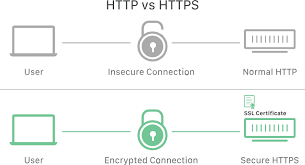
First, an SSL certificate encrypts your connection and data transferred, ensuring that bad actors don't get unauthorized access. Only your web server and the web browser your customer is using will be able to encrypt and decrypt any data transferred.
- Gives Your Website Credibility
With an SSL certificate installed, you get the 'HTTPs' protocol and the padlock seal of trust.
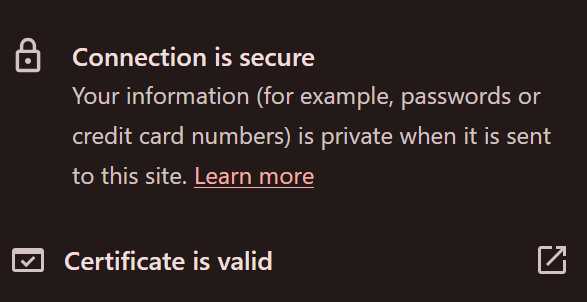
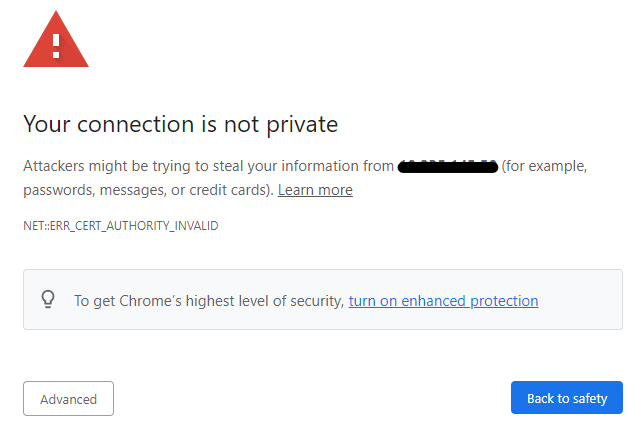
Customers know that their data is safe with you. Many modern browsers like Chrome don't even allow users to visit without SSL certificates installed so it's non-negotiable that you have one.
- It's A Critical SEO Check
Having the 'HTTPs' seal is now a ranking factor on Google. Without one, your website won't get indexed. Hence, installing one ensures that your SEO efforts are not undermined by your website getting delisted.
How To Choose The Right SSL Certificate For Your Needs
When it's time to choose your SSL certificate, you need to consider three core factors:
- Your Website Purpose Blog, Business, Organization?
First, is your website a blog, for a small eComm business, or a high-level enterprise? DV SSL certificates are best for blogs and low level websites that don't handle super sensitive data.
Businesses and organizations should use OV or EV SSL certificates for more protection.
- Your Budget
Next, how much are you looking to spend on your SSL certificate? DV SSL certificates are the most affordable and great for first time webmasters.
As your website grows and your security needs increase, you can then opt for OV and EV SSL certificates that provide the most security.
- The Number Of Domains That Need Protection
Have only one domain name? A free or DV SSL certificate with single domain protection should suffice. And if you have a main domain but also want to create multiple subdomains, then you'll need a wildcard certificate.
And finally, if you have multiple domain names, you'll need a multi-domain tier.
Trustname allows you to choose a single domain, wildcard, and multi-domain tier with our DV SSL certificate.
For our OV SSL certificate, you can choose a single domain and wildcard domain coverage. And with our EV SSL certificates, you can only choose a single domain or multi-domain coverage.
SSL Certificates Are Easy With Trustname
If you register your domain name with Trustname or transfer your domain name to Trustname, you won't have to generate a CSR.
we'll do that for you.
Simply log in to your domain management account, choose the SSL certificate you want to upgrade to, give us a few details for validation, and wait while the certificate authority works on it. That's it!
Was this article helpful?
That’s Great!
Thank you for your feedback
Sorry! We couldn't be helpful
Thank you for your feedback
Feedback sent
We appreciate your effort and will try to fix the article